Blog
Greptile review: how it works, pricing and how it compares
Greptile reviews pull requests with a graph of your whole codebase. What its reviews look like, what its credits cost, and how it ranks against cubic.
Alex Mercer
Greptile's bet is that a code reviewer should read your whole codebase before it reads your diff. It turns every repository you connect into a graph, reviews each pull request against that graph, and posts what it finds within a few minutes. As of October 2026 it costs $30 per developer a month, which covers 50 standard reviews, and every review after that is billed.
Our verdict: Greptile is a careful reviewer with a pricing model you have to watch. Its comments are usually worth acting on, it works on GitHub, GitLab and Bitbucket, and you can self-host it. But it ranks #3 on Martian's Code Review Bench (last-month view, checked October 10, 2026), and because it bills per review, deeper reviews and frequent re-reviews push the price up fast.
This blog belongs to cubic (cubic.dev), an AI code review tool that competes with Greptile and ranks above it on Martian's Code Review Bench, so weigh our opinions accordingly. The Greptile facts here come from its website, docs and changelog, read on October 10, 2026.
What is Greptile?
Open a pull request in a repository that uses Greptile, and within a few minutes a comment appears at the top: a plain-English summary of the change, a diagram of what it touches, and a score from 0 to 5 for how ready it is to merge. Under it, Greptile comments on specific lines, tagging each finding P0, P1 or P2 by severity.
The work behind that comment starts when you connect the repository. Greptile indexes it into a graph of every function, class and dependency, and its pitch is that each review judges a change by everything it touches, not only the lines in the diff.
Greptile is a Y Combinator company from the Winter 2024 batch and says more than 22,000 teams use it. It also has a CLI for reviewing your branch before you open a PR, an MCP server that hands its findings to coding agents, and TREX, which runs your branch in a sandbox to catch bugs that only show up at runtime.
What a Greptile review looks like
Here's a real one. On NVIDIA's DALI repository, a contributor opened a pull request to fix an off-by-one padding bug in a CenterCrop operator. Greptile tagged its comment P1: the new test only ran on the CPU, so nothing checked the fix on the GPU. It backed that up with the repository's own testing rule, quoted from its .greptile/config.json.
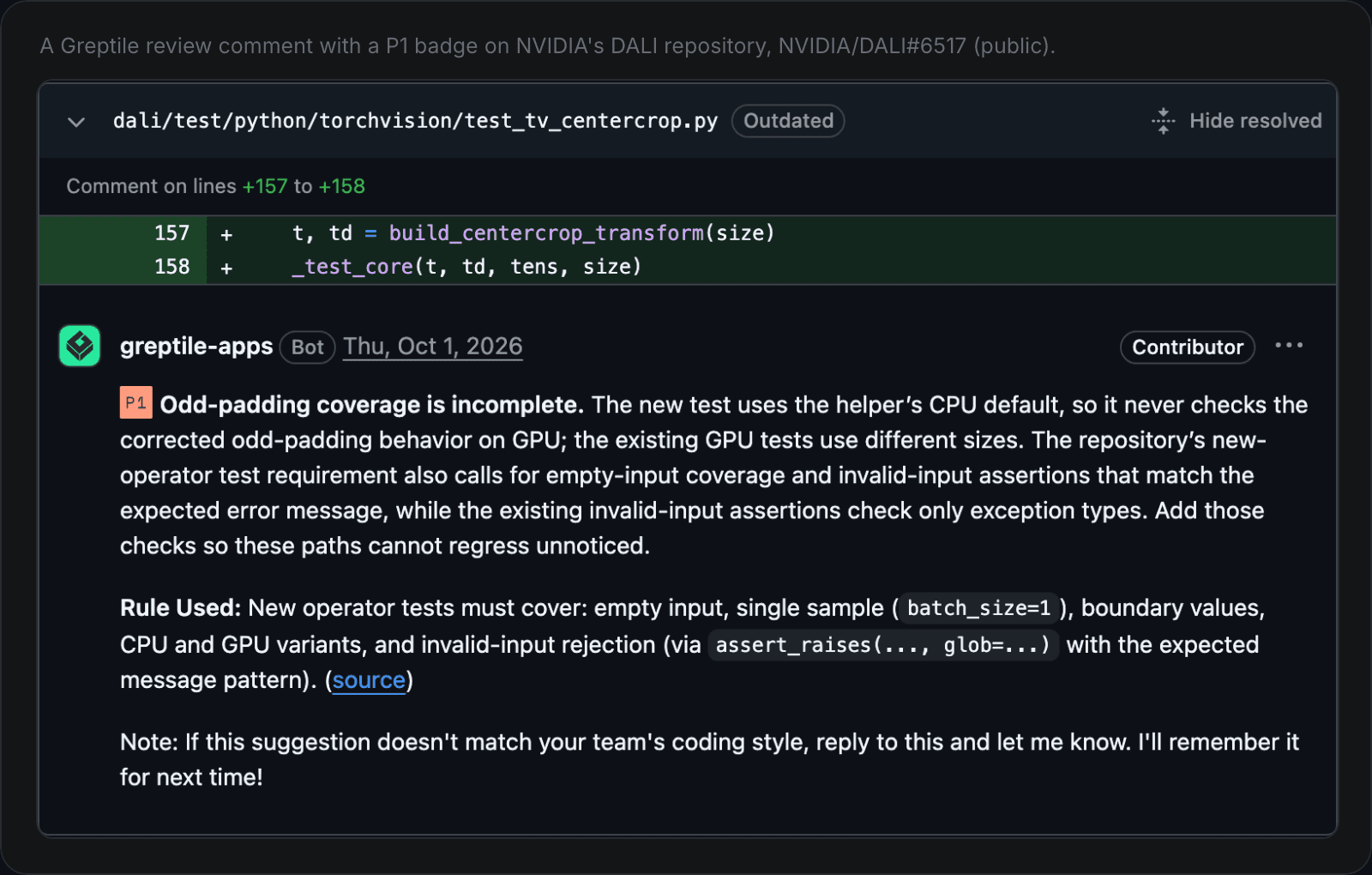
Greptile's P1 comment on NVIDIA/DALI#6517, citing a rule from the repository's .greptile/config.json.
That comment has most of what Greptile puts on every PR: a severity tag, a rule your team wrote, and a note asking you to reply if it got your style wrong, so it can learn. Most comments also include a code suggestion you can apply, and each one has a button that hands the issue to a coding agent such as Claude Code, Codex or Cursor. A Fix All button in the summary sends every issue at once.
Greptile pricing: is Greptile free?
Free for one developer. For a team, the number to understand is the credit.
The Starter plan is free for a single active developer, with 50 credits a month. Pro costs $30 per developer a month and includes 50 credits each, and every credit after that costs $1. A standard review uses 1 credit, so 50 reviews a month are covered. The deeper tiers are where it adds up. As of October 2026, from Greptile's pricing page and billing docs:
Review | Credits | Cost past the 50 included |
|---|---|---|
Base, the standard review | 1 | $1 |
Plus, "a deeper review for PRs that need extra scrutiny" | 3 | $3 |
Apex, "our most intensive review for large, complex PRs" | 10 | $10 |
Auto, where Greptile picks the tier by size, risk and complexity | 1, 3 or 10 | the tier that ran |
TREX, which runs your code (Base only for now) | 3 | $3 |
Three rules decide the bill:
Credits belong to the PR's author. Each developer gets their own 50, and overage is counted per author, so one prolific author can pay for extra credits while a teammate's go unused.
Every review counts. Greptile bills each completed review, so a PR reviewed again after new commits costs credits again.
You can cap it. Admins set a Flex Usage Limit in dollars for each billing period, or $0 to stop extra credits. At the cap, reviews that would cost extra are skipped until the next billing period.
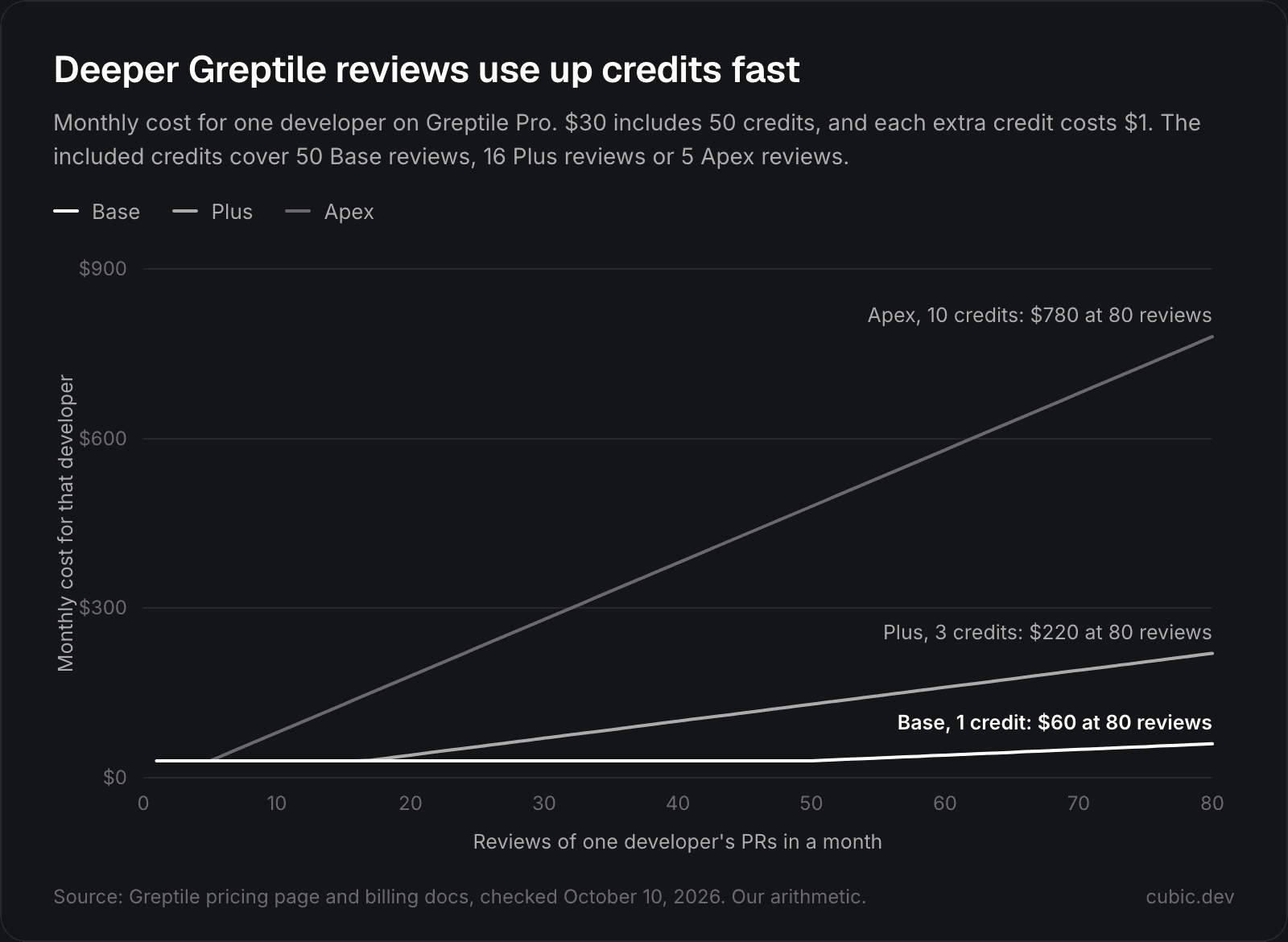
Monthly cost for one developer on Pro, by how many reviews their PRs get. Our arithmetic from Greptile's published prices, October 2026.
In practice: a developer whose PRs get 30 reviews a month costs $30 at Base, $70 at Plus and $280 at Apex. If coding agents open PRs for your team, or you turn on a review for every push, the review count climbs and the bill climbs with it.
Pro starts with a 14-day trial, which Greptile's TREX page says needs no card. Enterprise is priced on request and adds self-hosting, SSO and GitHub Enterprise support. Qualifying non-commercial open source projects can apply to use Greptile for free, and pre-Series A startups with under $2M in revenue get 50% off. Our Greptile alternatives post puts these prices next to five other tools.
Which git hosts does Greptile support?
More than most. GitHub, GitLab and Bitbucket work in Greptile's cloud on every plan. Self-managed servers, Gitea and Perforce need Enterprise, and Azure DevOps isn't on the list. From its code providers docs:
Host | Where Greptile supports it (October 2026) |
|---|---|
GitHub.com, GitLab.com, Bitbucket Cloud | Greptile's cloud, all plans |
Cursor Origin | Greptile's cloud, all plans, in beta |
GitHub Enterprise Server, GitHub Enterprise Cloud with data residency, GitLab Self-Managed, Bitbucket Data Center, Gitea | Enterprise, enabled by sales |
Perforce with P4 Code Review | Self-hosted Greptile only |
Azure DevOps | Not listed |
How to set up Greptile on GitHub
Setup takes a few minutes:
Sign in at app.greptile.com, go to Code Providers and click Connect GitHub Cloud.
Install the Greptile app on your GitHub account or organization, for All repositories or Only select repositories.
Back in Greptile, select the organization and click Link.
Pick the repositories to review and click Enable.
Open a pull request in one of them. The review arrives in about 3 minutes.
To have new repositories reviewed without enabling each one, turn on Auto-enable new repos under Settings → Repo Settings.
How to configure Greptile
Two settings shape most of what you'll see: when Greptile reviews, and how hard it looks.
When it reviews. In a config file, the autoReview setting defaults to reviewing a PR when it's opened, reopened or marked ready, and not on later pushes. Add push to review new commits too, knowing each of those reviews costs credits. Drafts are skipped unless you ask. Greptile's dashboard has the same choice, and its docs don't say what the dashboard defaults to.
How hard it looks. strictness runs from 1, which flags more, to 3, which flags only critical issues, and defaults to 2. effort sets the review tier for a folder. Greptile's docs suggest Auto as the default, with Apex for PRs into production branches and for PRs that change more than 30 files.
Both live in a .greptile/ folder, alongside plain-language rules. You can put a .greptile/ folder in any directory: the closest folder's settings win, and rules from every level apply. Changes take effect on the next PR. An example, with fields from Greptile's configuration reference:
On the PR itself, you talk to it in comments:
Comment | What happens |
|---|---|
| Runs a review, including on PRs opened before Greptile was installed |
| Reviews a draft PR |
| Runs that one review at a higher tier |
| Answers a question about the PR |
Does Greptile learn from your team?
Yes, slowly. It learns from thumbs-up and thumbs-down reactions on its comments, from your replies, and from which of its comments get addressed in later commits, and it turns repeated patterns into rules. Its docs say it keeps flagging security issues and logic errors however often you ignore them.
Plan for a noisy start. Greptile's docs say it takes 2-3 weeks of consistent reactions to adapt, and describe the first two weeks as "Standard suggestions, high noise." If you know what you want, writing rules in .greptile/ gets you there faster.
TREX, auto-approve, the CLI and MCP
Greptile keeps adding tools around the review itself:
TREX runs your PR branch in a sandbox. It starts services, mocks inputs and clicks through UI flows, then comments with evidence such as logs or screenshots. It costs 3 credits and works only with Base reviews for now. Greptile says it "catches ~20% more bugs than review alone."
Auto-approve, in beta, approves PRs that get a clean 5/5 review and stay under a risk level you set. Greptile's own advice is to start at Low, for docs, tests and small changes, and to use it "only for low-risk changes."
The CLI reviews your branch from the terminal before you open a PR: install it with
brew install greptileai/tap/greptile, then rungreptile loginandgreptile review.The MCP server lets Claude, Cursor, Copilot and Codex fetch Greptile's comments and apply its fixes, and Greptile's Claude Code plugin is in Anthropic's official plugin marketplace.
Can you self-host Greptile, and what happens to your code?
Yes, on Enterprise. Greptile runs in your own infrastructure on Docker Compose or Kubernetes, air-gapped if you need it, with your own model provider: OpenAI, Anthropic, AWS Bedrock, Azure OpenAI or GCP Vertex AI.
On Greptile's cloud, its security page says your code stays cached on an encrypted filesystem until you revoke access, and that Greptile may train AI models on aggregated, de-identified data unless you turn that off in your account settings. Reviews run on OpenAI's and Anthropic's APIs, and Greptile is SOC 2 Type II compliant.
Is Greptile worth it?
On the numbers, Greptile is good but not the best. Martian, which describes itself as a research lab that doesn't sell coding tools, runs the Code Review Bench, which scores review bots on real open-source pull requests. It ranks them by F1, which combines how often developers act on a reviewer's comments with how many of the real bugs it catches. In the last-month view, checked October 10, 2026:
Rank | Tool | F1 |
|---|---|---|
1 | cubic | 64.0% |
2 | Kody AI | 63.4% |
3 | Greptile | 63.2% |
4 | CodeRabbit | 61.8% |
5 | Claude | 60.9% |
So who is Greptile worth it for? Teams on GitLab, Bitbucket, Gitea or Perforce, teams that need to self-host or run air-gapped, and teams who want few comments and are fine leaving some bugs to human reviewers. It's a harder sell if your code is on Azure DevOps, or if your developers open a lot of PRs and you want every push reviewed without counting credits.
Greptile vs cubic
This is where our bias matters most, so we'll stick to what each product documents. Prices are as of October 2026, from Greptile's pricing page and billing docs and cubic's pricing page.
Greptile | cubic | |
|---|---|---|
Git hosts | GitHub, GitLab and Bitbucket in the cloud; self-managed hosts, Gitea and Perforce on Enterprise | GitHub only |
Price | $30 per developer a month with 50 credits each, then $1 per credit | Team $30, Pro $79, Max $160 per developer a month billed yearly ($40, $99, $200 monthly) |
What limits usage | Credits per review: Base 1, Plus 3, Apex 10 | A pooled allowance of 40,000, 80,000 or 160,000 reviewed lines per developer a month, then $20 per 10,000 lines |
Free options | Starter for 1 developer; 14-day Pro trial | A free plan with 20 PR reviews a month; 7-day trial with no card; free for public repos within fair-use limits |
Deeper reviews | Plus and Apex tiers, and TREX | Ultrareview, which counts 3x against the allowance |
Rules and learning |
| Plain-English custom agents and |
Fixes | Buttons that hand issues to Claude Code, Codex, Conductor, Cursor or Devin | Fix with cubic, on Pro and Max |
Self-hosting | Enterprise, with your own models | Not listed on cubic's plans |
Compliance | SOC 2 Type II | SOC 2 Type 1 |
Martian Code Review Bench, last month (checked Oct 10, 2026) | #3 (63.2% F1) | #1 (64.0% F1) |
The differences that matter:
cubic is GitHub only. If your code lives anywhere else, Greptile can review it and cubic can't.
cubic pools usage instead of billing per review. Every seat adds reviewed lines to one allowance the whole team shares, so a busy author doesn't burn through their own budget, and a re-review counts only the lines that changed since the last one.
cubic ranks higher on Martian's Code Review Bench. It's #1 in the last-month view, with Greptile at #3.
For more options, see our ranking of the best AI code review tools, our roundup of Greptile alternatives and CodeRabbit vs Greptile.
Run any reviewer on a week of your own pull requests before you trust a ranking, ours included. If you're on GitHub, try cubic's AI code reviewer next to Greptile on the same PRs: the trial lasts 7 days and needs no card.
