Blog
CodeRabbit review: pricing, setup and how it compares
CodeRabbit pricing starts at $24 per developer a month billed yearly, and its free plan doesn't review PRs. What each plan adds, setup, and how it scores.
Alex Mercer
CodeRabbit is an AI code review tool for pull requests on GitHub, GitLab, Bitbucket and Azure DevOps, with a CLI and an editor extension for reviews before you push. As of October 2026, CodeRabbit pricing runs from $24 to $72 per developer a month billed yearly, with Enterprise priced on request, and you pay only for developers who open pull requests. Public repositories get free reviews, but the Free plan for everything else writes PR summaries and doesn't review pull requests.
Our verdict: CodeRabbit is the safe choice if your code isn't on GitHub, and a strong one if it is. On Martian's Code Review Bench (last-month view, checked October 10, 2026), it ranks #4, behind cubic, Kody AI and Greptile. Before you buy, check two things: whether your plan's hourly review cap fits how your team opens pull requests, and whether you want linter results in every review.
This blog belongs to cubic (cubic.dev), an AI code review tool that competes with CodeRabbit, so weigh our opinions accordingly. The CodeRabbit facts here come from CodeRabbit's pricing page, docs and FAQ, read on October 10, 2026.
What is CodeRabbit?
By default, CodeRabbit reviews each new pull request to the default branch in the repositories you connect, skipping drafts, and reviews again as you push more commits. After 5 reviewed commits it pauses automatic reviews on that PR, a number you can change. A review adds a summary to the PR description under "Summary by CodeRabbit", comments on specific lines with suggested fixes, and answers when you reply to one of its comments.
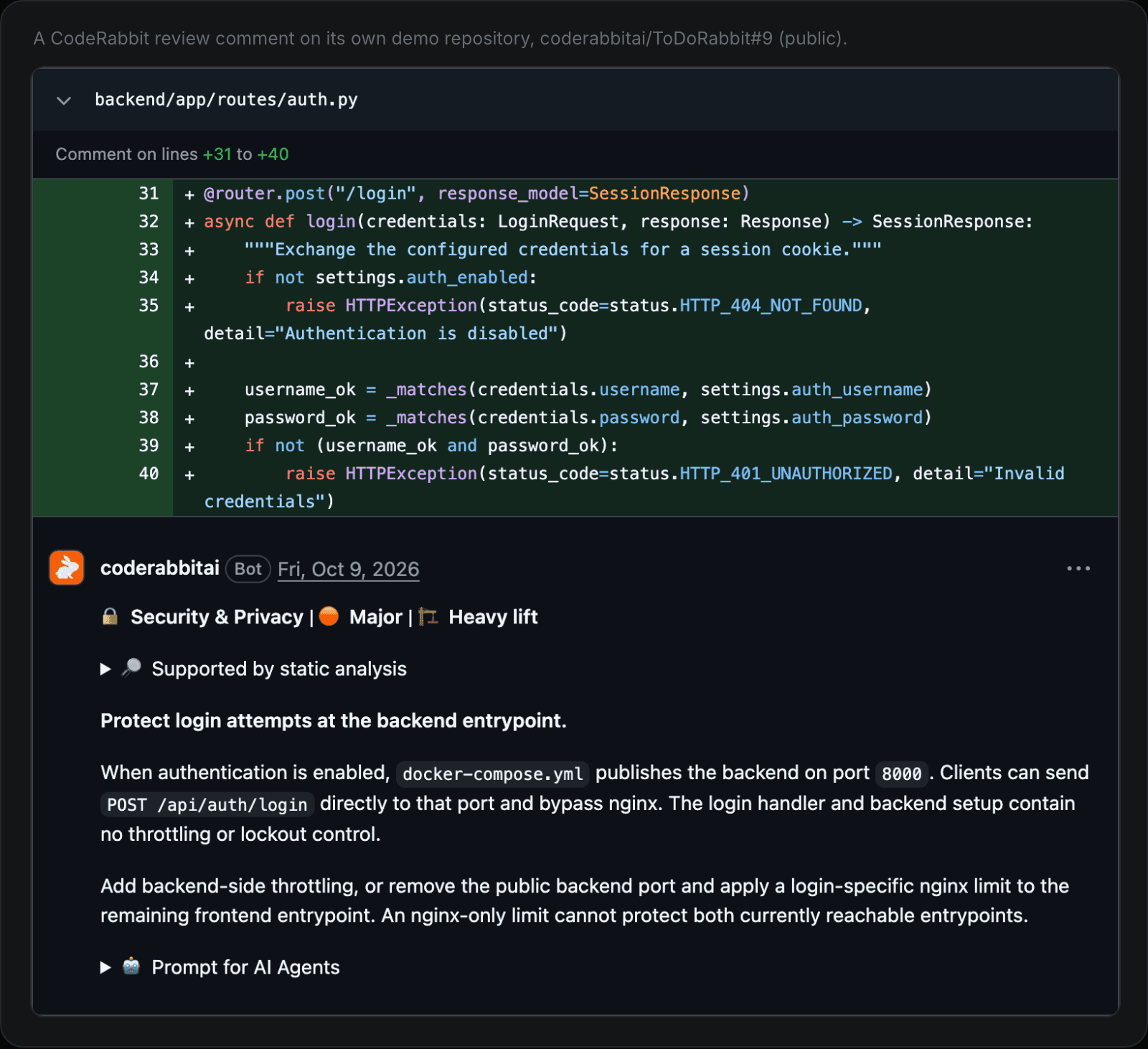
A CodeRabbit comment on its own demo repository, labeled with a category, a severity and an estimate of the effort to fix it (coderabbitai/ToDoRabbit#9).
Next to the AI review, it runs linters and security scanners. Its configuration reference lists 59 tools, among them ESLint, Ruff, Semgrep, Gitleaks and Trivy, each switched on by default.
You can also run a CodeRabbit review before you open a pull request, from its CLI or from its extension for VS Code, Cursor and Windsurf.
CodeRabbit pricing: is CodeRabbit free?
For public repositories, yes. For private code, the Free plan doesn't review pull requests. CodeRabbit's paid plans start with a 14-day free trial that needs no card, and organizations that don't subscribe afterwards move to the Free plan. Free writes PR summaries, and its reviews run only in the editor extension and the CLI, 3 an hour each.
As of October 2026, the plans look like this, from CodeRabbit's pricing page and plans docs:
Plan | Per developer a month, billed yearly | Billed monthly | PR reviews per developer per hour | What it adds |
|---|---|---|---|---|
Free | $0 | $0 | Summaries only | PR summaries; editor and CLI reviews, 3 an hour each |
Open source | $0 | $0 | 1 to 10, by repository popularity | Team features on public repositories |
Essentials (was Pro) | $24 | $30 | 5 | Reviews in PRs, the editor and the CLI; learning from your feedback; chat; pre-merge checks; 1-click fixes |
Team (was Pro Plus) | $48 | $60 | 8 | Unit test generation, finishing touches, post-merge actions, Triage, 10 custom pre-merge checks |
Advanced | $72 | $90 | 10 | A blast-radius audit, continuous security monitoring, an attack-surface view |
Enterprise | Custom | Custom | 12 | SSO, custom roles, audit logs, an API, self-hosting from 500 seats, a choice of SaaS region |
Two more limits change with the plan. A review covers up to 150 files on Free and Essentials and 300 on Team and above, counted after your path filters. Multi-repo analysis, which checks a change against your other repositories, can link 1 repository on Essentials, 5 on Team, 10 on Advanced and 20 on Enterprise. The number of repositories CodeRabbit reviews is unlimited on every plan.
Three things move the bill:
Seats. You pay only for developers who create pull requests, and you can assign seats by hand. Billing yearly saves 20%.
Hourly caps. The limits in the table are base rates. Under CodeRabbit's fair-usage policy, a developer with sustained heavy use gets fewer reviews an hour, down to one. On Essentials, for example, the rate drops from 5 an hour once a developer reaches 30 PR reviews in 7 days, and to 1 an hour at 60. Past the limit, Essentials, Team and Advanced can keep reviewing at $0.25 per reviewed file. Admins choose Automatic, On demand or Off, and can set a monthly cap. Pull requests with more than 300 files can't be reviewed this way.
The agent and scans. CodeRabbit's agent costs $0.40 per agent minute once the free minutes run out, and Deep Scan, which reviews a whole repository, is billed separately by usage, at a price that varies by scan.
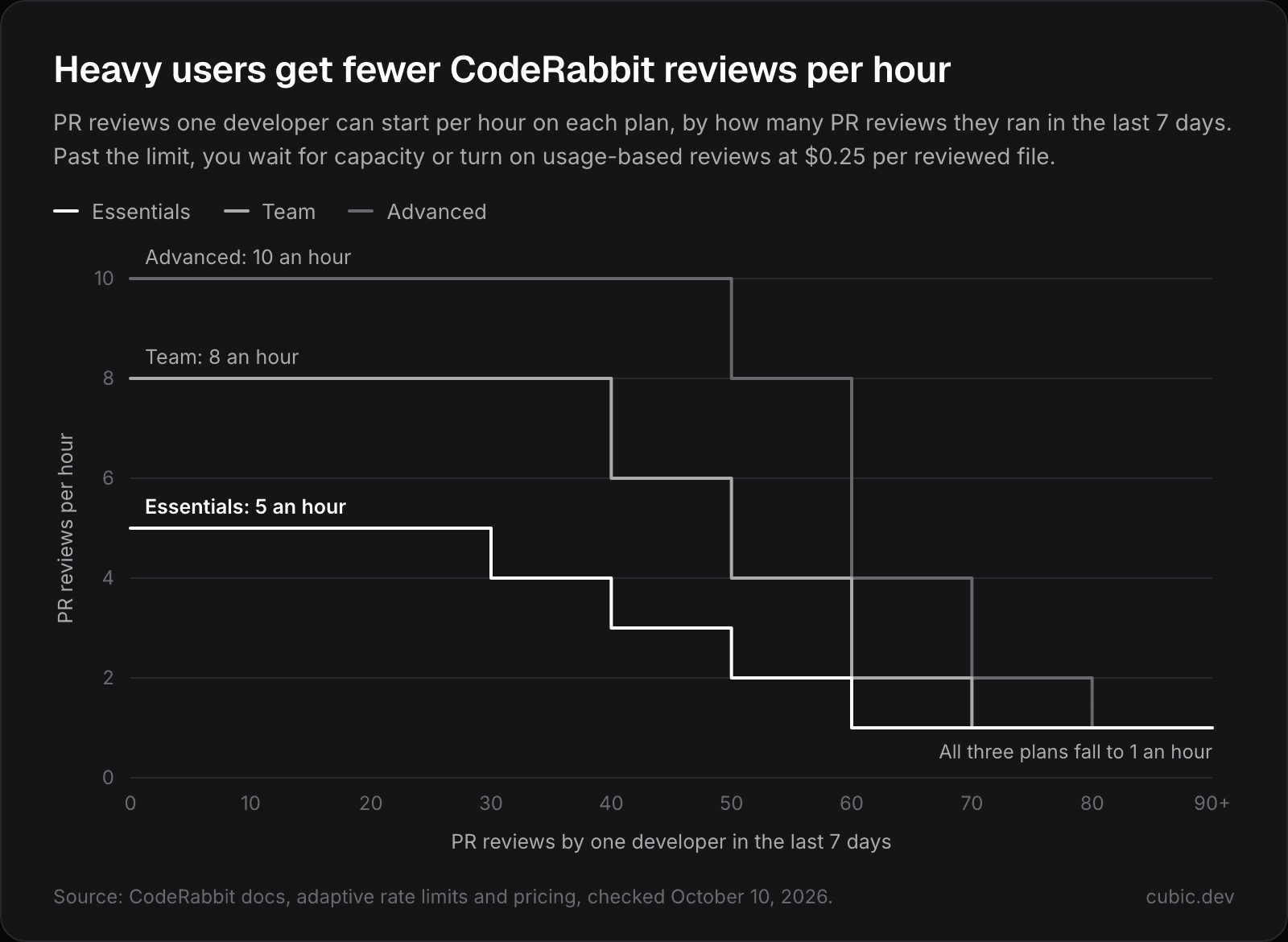
CodeRabbit's adaptive hourly limits by plan, from its rate limits docs.
When a developer hits the limit, CodeRabbit comments on the pull request and adds a check named "Review rate limited". The check passes, so it never blocks a merge, but no review runs. Comment @coderabbitai rate limit to see how many reviews you have left.
A rough example, with our arithmetic: 10 developers who open pull requests pay $2,880 a year on Essentials, $5,760 on Team or $8,640 on Advanced, billed yearly, before any usage charges. Our AI code review pricing comparison puts those numbers next to other tools.
How that compares with cubic: on monthly billing, cubic's Team plan costs $40 per developer a month against $60 for CodeRabbit's Team plan, so cubic is a third cheaper. For 10 developers that's $400 a month instead of $600. cubic's Team plan includes 5 custom review agents, and its review allowance is pooled across the team, so a burst of agent PRs doesn't run into an hourly cap.
Which CodeRabbit plan do you need?
Essentials covers most small teams. It reviews pull requests in every repository you connect, and heavy users feel its 5-an-hour cap first.
Team is the step up when you want custom pre-merge checks, unit test generation or Triage, reviews of up to 300 files, or multi-repo analysis across up to 5 repositories.
Advanced adds the security features: security review, a blast-radius audit and continuous security monitoring.
Enterprise is for SSO, custom roles, audit logs, API access, or self-hosting from 500 seats.
Does CodeRabbit work with GitLab, Bitbucket or Azure DevOps?
Yes. CodeRabbit's platforms docs list all four hosts, with cloud and self-managed versions of GitHub, GitLab and Bitbucket, though its pricing page and FAQ mention only GitHub and GitLab.
Host | What CodeRabbit's docs list (October 2026) |
|---|---|
GitHub | GitHub.com and GitHub Enterprise Server |
GitLab | GitLab.com and GitLab self-managed |
Bitbucket | Bitbucket Cloud and Bitbucket Data Center |
Azure DevOps | Azure DevOps |
Private networks | GitHub Enterprise Server or self-managed GitLab behind your firewall, through CodeRabbit's reverse tunnel, without opening inbound access |
Running CodeRabbit on your own servers is a separate offer. Self-hosting is for Enterprise customers with 500 or more seats, who run CodeRabbit's container image in their own environment and can connect their own LLM provider.
How to set up CodeRabbit on GitHub
You need owner rights on the repository, and organization owner rights for an organization's repositories. Then:
Go to app.coderabbit.ai/login, click Login with GitHub, then Authorize coderabbitai.
Pick your organization, or your own account for personal repositories.
Choose All repositories or Only select repositories.
Check the permissions and click Install & Authorize. CodeRabbit asks for read and write access to checks, code, commit statuses, issues, pull requests and workflows. Its docs say the workflows permission is used only when you ask its agent to fix CI or write a workflow.
Open a pull request, or pick an existing one on the last setup screen, and read CodeRabbit's comments.
On public repositories with fewer than 10 stars, reviews don't start on their own. Comment @coderabbitai review to run one.
CodeRabbit commands and configuration
Comment commands
These PR comments control CodeRabbit:
Comment on the PR | What happens |
|---|---|
| Reviews the changes since the last review |
| Reviews the whole PR again from scratch |
| Stops or restarts automatic reviews on the PR |
| Turns off automatic reviews for that PR |
| Marks all of CodeRabbit's comments as resolved |
| Resolves its threads and approves the PR, if |
| Rewrites the "Summary by CodeRabbit" section |
| Posts the settings in effect for the repository |
| Shows how many reviews you have left, without starting one |
Settings as code: .coderabbit.yaml
CodeRabbit reads .coderabbit.yaml from the repository root, using the copy on the branch under review. It also reads guideline files such as AGENTS.md, CLAUDE.md and .cursorrules by default. A short example, with keys from CodeRabbit's configuration reference:
profilesets how much CodeRabbit comments:quietposts only the most important comments inline and groups the rest in the review summary,chillis the default, andassertivecomments more, which CodeRabbit warns may feel nitpicky.With
request_changes_workflowon, CodeRabbit approves the PR once its comments are resolved, the latest commit has been reviewed and no pre-merge checks fail.path_instructionsadds review guidance for matching files, up to 20,000 characters each.learnings.scopedecides whether a repository uses only its own learnings (local) or the whole organization's (global). The default,auto, is local for public repositories and global for private ones.
CodeRabbit CLI and editor reviews
The CodeRabbit CLI, in open beta, reviews your local changes against the base branch:
For coding agents, cr --agent prints one JSON object per line, and Claude Code, Cursor and Codex each have a CodeRabbit plugin. CodeRabbit's docs say a review "can take 7-30+ minutes depending on the scope of changes", so they suggest running it in the background and capping how many fix-and-review rounds the agent does.
The editor extension runs CodeRabbit reviews in VS Code, Cursor and Windsurf. On paid plans, editor and CLI reviews each get the same hourly limit as PR reviews: 5, 8, 10 or 12 an hour, by plan.
Does CodeRabbit store or train on your code?
According to CodeRabbit's FAQ, it doesn't keep your source code after a review completes unless review caching is on, and cached data is encrypted, expires automatically and is never used for training. You can opt out of data storage. CodeRabbit says it is SOC 2 Type II certified and GDPR compliant.
Is CodeRabbit any good?
It's a strong reviewer, but not the top one. On Martian's Code Review Bench (last-month view, checked October 10, 2026), CodeRabbit ranks #4 of 15 by F1, at 61.8%, behind cubic, Kody AI and Greptile.
Martian, which describes itself as a research lab that doesn't sell coding tools, scores review bots on real open-source pull requests. It ranks them by F1, which combines how often developers act on a reviewer's comments with how many of the real bugs it catches. The top five:
Rank | Tool | F1 |
|---|---|---|
1 | cubic | 64.0% |
2 | Kody AI | 63.4% |
3 | Greptile | 63.2% |
4 | CodeRabbit | 61.8% |
5 | Claude | 60.9% |
cubic ranks #1 on Martian's Code Review Bench and finds more of the real bugs than CodeRabbit (58.5% recall to 54.4%).
How CodeRabbit compares with cubic
This is where our bias matters most, so we'll stick to what each product documents. Prices are as of October 2026, from CodeRabbit's pricing page and plans docs and cubic's pricing page.
CodeRabbit | cubic | |
|---|---|---|
Git hosts | GitHub, GitLab and Bitbucket (cloud and self-managed) and Azure DevOps | GitHub only |
How you pay | Per developer who opens PRs: Essentials $24, Team $48, Advanced $72 a month billed yearly ($30, $60, $90 monthly) | Per developer: Team $30, Pro $79, Max $160 a month billed yearly ($40, $99, $200 monthly) |
Usage limits | 5 to 12 PR reviews per developer per hour at base rates, by plan, then $0.25 per reviewed file if you turn on usage-based reviews | A pooled allowance of 40,000, 80,000 or 160,000 reviewed lines per developer a month, then flex capacity at $20 per 10,000 lines |
Free options | 14-day trial with no card, free for public repos, a Free plan with PR summaries plus 3 editor and 3 CLI reviews an hour | 7-day trial with no card, a free plan with 20 PR reviews a month, free for public repos within fair-use limits |
Review rules |
| Plain-English custom agents with path filters, |
Learning | Learns from your feedback, per repository or across the organization | Replies, thumbs up and down, and the past PR comments of up to five senior reviewers you choose |
Linters and scanners | 59 tools, on by default | None bundled |
Local reviews | CLI (open beta) and an extension for VS Code, Cursor and Windsurf | cubic CLI, MCP server and skills for coding agents |
Fixes | 1-click fixes; its agent at $0.40 per agent minute | Fix with cubic, on Pro and Max |
Compliance | SOC 2 Type II, GDPR | SOC 2 Type 1 |
Martian Code Review Bench F1 (last month, checked Oct 10, 2026) | 61.8% (#4) | 64.0% (#1) |
In practice, cubic differs in four places:
GitHub only. If your code is on GitLab, Bitbucket or Azure DevOps, CodeRabbit can review it and cubic can't. That settles it.
Limits by volume. cubic meters reviewed lines: each seat adds to a pool the whole team shares. When the pool runs out, reviews pause until the reset, or flex capacity buys more at $20 per 10,000 lines, up to a monthly limit you can set.
Approvals and repo scans work differently. cubic auto-approves PRs that meet a policy you set, starting in shadow mode (Team, Pro and Max), while CodeRabbit approves once its comments are resolved if you turn on
request_changes_workflow. cubic's codebase scans audit the whole repository (Pro and Max, beta, by request); CodeRabbit's Deep Scan, which reviews a whole repository, is billed by usage.No bundled linters. CodeRabbit puts linter and scanner results in its review. With cubic, your linters stay in CI.
For the full side-by-side, see cubic vs CodeRabbit.
Who should use CodeRabbit
CodeRabbit fits if:
Your code lives on GitLab, Bitbucket or Azure DevOps, or on more than one host.
You want linter and scanner results inside the AI review instead of in a separate CI step.
You maintain a public repository. Reviews are free, though under 10 stars you start each one with a comment.
You need to self-host at 500 or more seats, or your security review asks for SOC 2 Type II.
Look elsewhere if you're on GitHub and want the top-ranked reviewer on Martian's Code Review Bench (last-month view, checked October 10, 2026). If your team opens pull requests in bursts, for example from coding agents, price the reviews past the hourly caps, at $0.25 per reviewed file, before you buy. Our roundup of CodeRabbit alternatives covers more options, and CodeRabbit vs Greptile compares it with Greptile, one place above it on the benchmark.
Run any reviewer on a week of your own pull requests before you trust a ranking, ours included.
If you're on GitHub, try cubic's AI code reviewer next to CodeRabbit on the same PRs. Both can review the same pull request, and cubic's trial lasts 7 days with no card.
